🗄️ CRM Tools for RevOps
The foundation of your revenue operations stack. CRM platforms that RevOps teams configure, maintain, and optimize for pipeline visibility and data integrity.
Key Takeaways
- The CRM choice mostly comes down to account-centric flexibility (Salesforce) versus faster time-to-value (HubSpot).
- Every customization is a recurring maintenance cost, so weigh admin burden as heavily as features.
- Clean, well-modeled CRM data is the precondition for trustworthy routing, enrichment, and forecasting downstream.
Reviews
The dominant enterprise CRM. RevOps teams spend 40%+ of their time configuring, cleaning, and reporting from Salesforce....

The all-in-one CRM that RevOps teams at SMB and mid-market companies rely on for unified marketing, sales, and service d...
Comparisons
A CRM (customer relationship management) platform is the system of record where a revenue team stores accounts, contacts, opportunities, and activity history. For Revenue Operations, it is less a sales app and more the data spine that every report, routing rule, and forecast reads from.
Who These Tools Are For
- RevOps and Sales Ops teams that own pipeline reporting and need one trusted source of opportunity data.
- Growing companies moving off spreadsheets that want stage definitions, required fields, and validation enforced in one place.
- Leaders who want forecast roll-ups, win-rate analysis, and territory views without exporting data to a separate BI tool first.
How to Evaluate CRM Tools
Data model fit
Decide whether your business is account-centric (complex B2B with multiple buyers per account) or contact-centric (high-volume, single-buyer motions). Salesforce leans toward a flexible, highly customizable account model; HubSpot starts simpler and is faster to configure for smaller teams. The wrong model forces years of workarounds, so test it against your real deal shapes before signing.
Admin burden vs. flexibility
Every customization is a future maintenance cost. Ask how many validation rules, flows, and custom objects you realistically need, and who will own them. A platform that is endlessly configurable also demands a dedicated admin; a more opinionated platform trades flexibility for lower ongoing upkeep.
Reporting and forecast depth
Look at whether the native reporting answers your top five leadership questions without a bolt-on. If you already plan to add a revenue intelligence or BI layer, you can weight native reporting lower and prioritize clean, queryable data instead.
Ecosystem and integrations
The CRM is the hub your enrichment, routing, sequencing, and CPQ tools plug into. Confirm the marketplace has mature, supported connectors for the rest of your stack, because brittle integrations land on the RevOps desk.
The CRM Landscape
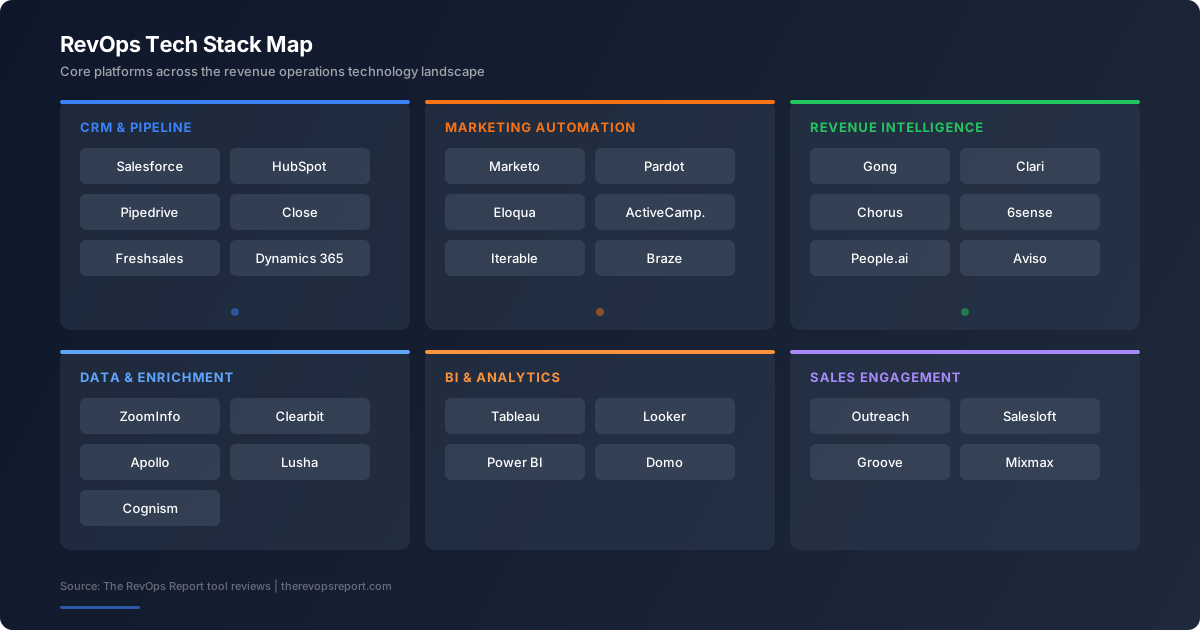
On this page we cover the two CRMs that dominate RevOps job descriptions and tech stacks: Salesforce, the customizable enterprise standard, and HubSpot, the all-in-one platform favored by SMB and mid-market teams. The comparisons below put them head to head and against Microsoft Dynamics 365 so you can match the platform to your team's stage and complexity.
Jump to a review: Salesforce · HubSpot.
How RevOps actually uses the CRM
Day to day, RevOps treats the CRM as a control surface rather than a sales app. The team encodes the sales process as stages and required fields, builds the validation that keeps opportunity data trustworthy, and maintains the reports leadership reads every Monday. When a forecast looks wrong, the root cause is almost always upstream: a missing close date, a duplicate account, or a stage that reps interpret differently. That is why CRM administration and data governance, not feature adoption, dominate the RevOps workload.
Build versus configure
The central tension in CRM ownership is how much to customize. Every custom field, flow, and object you add solves a problem today and creates a maintenance liability tomorrow. Mature teams keep a tight schema, document why each customization exists, and resist the temptation to mirror every quirk of the sales motion in metadata. A lean, well-governed org is easier to report on, easier to integrate, and far cheaper to change than one buried in years of accreted automation.
Total cost beyond the license
The sticker price of a CRM seat understates the real cost. Budget for the administrator who owns the org, the integrations that connect it to the rest of the stack, the data hygiene work that keeps it clean, and the change-management overhead as the business evolves. A platform that looks cheaper per seat can cost more in total if it forces heavier customization or weaker native reporting that you then backfill with extra tools.
Common Mistakes RevOps Teams Make
- Customizing the schema to match every rep request, which turns the org into an unmaintainable tangle within a year.
- Treating reporting problems as a BI gap when the real issue is dirty or inconsistently entered opportunity data.
- Choosing a platform on feature lists rather than on whether its data model fits how your deals actually work.
The Bottom Line
For most RevOps teams the CRM decision is a long-term commitment, so optimize for data-model fit and governance over feature breadth. Pick the platform whose account or contact model matches how your deals actually work, keep the schema lean, and budget for the admin and hygiene work that keeps it trustworthy. The reviews and comparisons above show how Salesforce and HubSpot trade flexibility against time-to-value so you can match the choice to your stage.
Frequently Asked Questions
What is the best CRM for a RevOps team?
There is no single best CRM; the right choice depends on your deal complexity and team stage. Salesforce suits account-centric enterprise motions that need deep customization, while HubSpot suits SMB and mid-market teams that want faster setup and a unified marketing-sales-service data layer. Map both against your real opportunity shapes before deciding.
What is the difference between Salesforce and HubSpot for RevOps?
Salesforce is highly customizable and account-centric, which makes it powerful for complex B2B but heavier to administer. HubSpot is more opinionated and faster to configure, with marketing automation built in. Salesforce typically needs a dedicated admin; HubSpot can often be run by a generalist RevOps owner.
How much of a RevOps role is spent inside the CRM?
A large share. RevOps teams spend much of their week configuring fields and validation rules, cleaning records, building reports, and maintaining integrations that read from and write to the CRM. The CRM is the data spine, so its health directly drives forecast and routing accuracy.
Do I need a separate reporting tool on top of my CRM?
Not always. Both Salesforce and HubSpot have native reporting that answers most leadership questions. You add a BI or revenue intelligence layer when you need cross-object analysis, blended data sources, or forecasting that the native tools cannot express cleanly.
When should a company migrate CRMs?
Migrate when the data model actively fights your go-to-market motion, when admin overhead outweighs the value, or when a merger forces consolidation. Migrations are expensive and risky, so the trigger should be a structural mismatch, not a feature gap you can close with an add-on.
Sources & Further Reading
Related: Best CRM tools, ranked.